Toggle Music
Apple Music e Spotify, nella barra dei menu.
macOS 14.0 o successivo · Versione 1.4
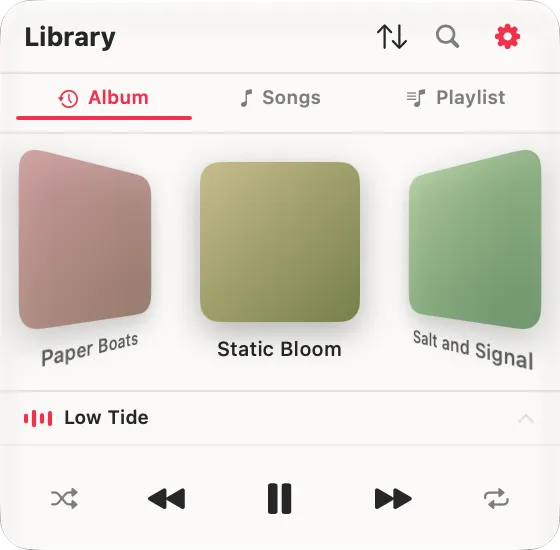
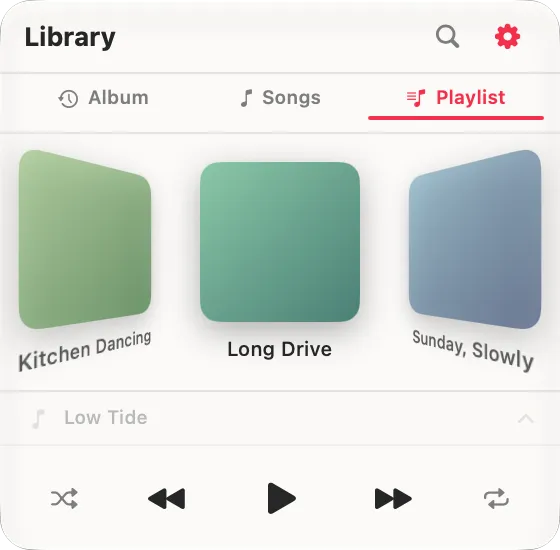
Cover Flow
Sfoglia i tuoi album in un carosello 3D. Com'era la musica una volta.
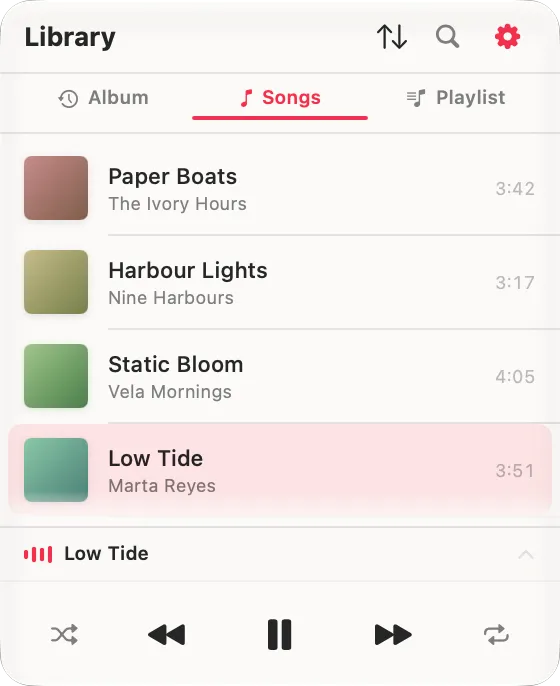
Ogni brano, un elenco
Novità della 1.4. La tua libreria come un unico elenco, ordinata come vuoi tu. Riproduci un brano e tutto quello sotto si mette in coda, nell'ordine in cui lo stai guardando.
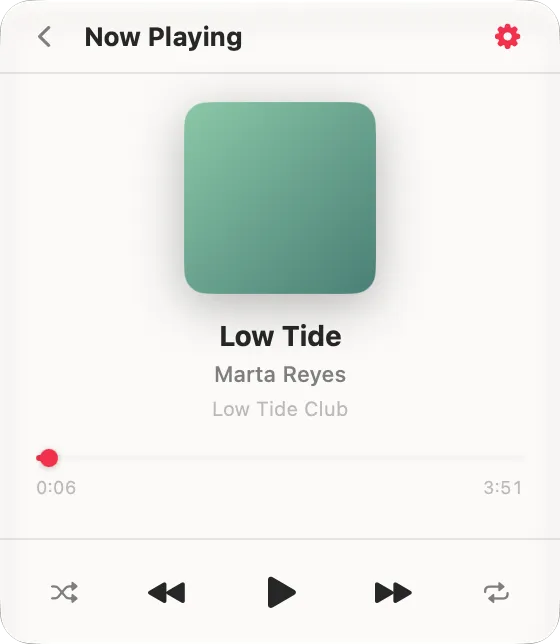
In riproduzione
Il brano corrente a tutta dimensione, con copertina e comandi: riproduci, metti in pausa e salta direttamente dal pannello.
Playlist, fissate
Le tue playlist di Apple Music vivono nello stesso pannello, nel layout che hai scelto. Fai clic destro su un album o una playlist per fissarli in cima.
Falla tua
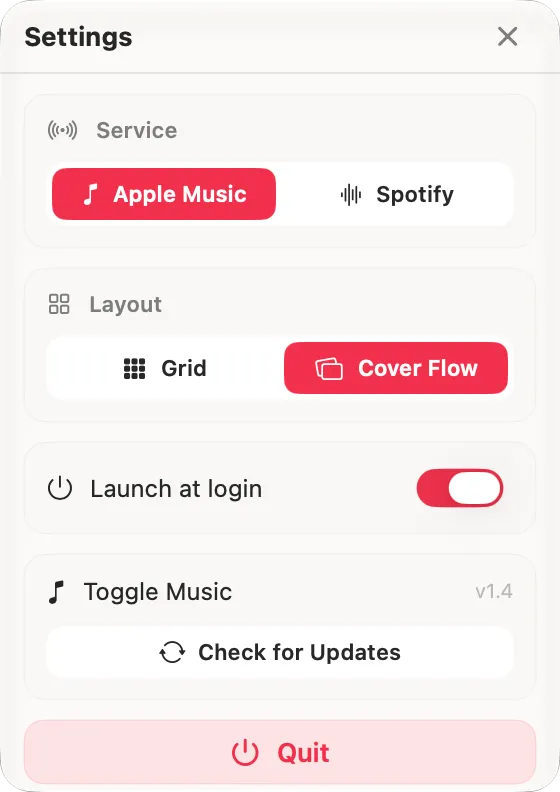
Passi da Apple Music a Spotify, cambi il layout e avvii al login, tutto da un unico pannello ordinato.
-
Ricerca istantanea (Apple Music)
Trova i brani e gli album che vuoi in tutta la libreria, dallo strumento di ricerca integrato nel pannello. I risultati si filtrano mentre scrivi, e toccandone uno lo riproduci.
-
Una coda davvero tua (Apple Music)
Fai maiusc-clic su un brano per metterlo in coda e costruire l'ordine che vuoi davvero. Successivi mostra esattamente cosa arriva, shuffle compreso, perché Toggle Music costruisce la coda da sé e la passa all'app Musica.
-
Apple Music e Spotify
Passi dall'uno all'altro con un tocco. Su Spotify, Toggle Music controlla l'app che hai già, Free o Premium, e costruisce una libreria dai tuoi ascolti recenti; sfogliare e cercare restano nell'app Spotify.
-
In Apple Music conta tutto
Le code che costruisci e i brani che riproduci in Toggle Music vengono registrati e contati anche in Apple Music, perché la riproduzione avviene dentro l'app Musica stessa e non accanto.
- Licenza inclusa, qualunque cifra scegli
- macOS 14.0 Sonoma o successivo
- Apple Silicon
- Rimborso entro 14 giorni su quanto hai lasciato
- Aggiornamenti inclusi, si installano nell'app
Toggle Music si distribuisce fuori dal Mac App Store: un DMG autenticato, firmato con un Apple Developer ID, che si aggiorna da sé. Ogni aggiornamento è verificato contro una chiave di firma incorporata nell’app, così un download manomesso viene rifiutato anche se arriva dall’indirizzo giusto.
- Una prova gratuita di 7 giorni. Tutta l'app, niente di trattenuto, e nessuna carta per iniziare.
- Nuova scheda Brani: tutta la tua libreria come un unico elenco, nello stesso ordine con cui ordini gli album.
- Riprodurre un brano ora mette in coda tutto quello sotto, nell'ordine in cui lo stai guardando. Non sei più limitato a un album o a una playlist.
- Una licenza, ogni Mac che possiedi: il limite di due dispositivi non c'è più.
- Apple Music ora riproduce tramite l'app Musica, quindi Lossless e Audio Spaziale sono preservati. E i brani che non hai scaricato si riproducono lo stesso, invece di non fare niente in silenzio.
- Le playlist che hai aggiunto da Apple Music ora si riproducono. I loro brani spesso non sono nella tua libreria, e Toggle Music cercava nel posto sbagliato.
- Successivi è costruito da Toggle Music e mostra esattamente cosa arriva, shuffle compreso. Fai maiusc-clic su un brano per riprodurlo subito dopo.
- Corretto: scegliere un brano dentro una playlist faceva partire la playlist dal primo brano.
- Corretto: un brano poteva essere scambiato con un altro che per caso aveva lo stesso titolo.
- Ora puoi chiudere Toggle Music direttamente dalla schermata di sblocco.
- Il pulsante "Compra una licenza" ora apre lo store direttamente.
- Supporto Spotify: controlla l'app Spotify che hai già, con Free o Premium.
- La libreria ora include i file locali di Musica.app accanto ai tuoi album di Apple Music.
- Ordinamento degli album unificato tra tutte le fonti.
Davvero posso metterla a zero?
Sì. Alla cassa trovi una casella con l'importo: puoi lasciare quello che c'è scritto, alzarlo, abbassarlo o portarlo a zero. In tutti i casi ricevi la stessa app e la stessa licenza, senza funzioni tenute da parte per chi paga.
E allora perché dovrei pagare?
Perché Toggle Music la sviluppo e la mantengo io, e quello che lasci decide quanto tempo posso dedicarle. Se l'app ti risolve un problema tutti i giorni, scegli l'importo che ritieni giusto.
Con quali servizi di musica funziona?
Apple Music e Spotify. Toggle Music è un lettore compagno: riproduce dalla tua libreria e dal tuo abbonamento esistenti, non trasmette musica per conto suo.
Mi serve Spotify Premium?
No. Spotify funziona con Free e Premium, perché Toggle Music riproduce tramite l'app desktop di Spotify che hai già.
È uguale su Apple Music e Spotify?
No. Apple Music è l'esperienza completa: Cover Flow, griglia, ricerca su tutta la libreria, In riproduzione, coda e brani fissati. Su Spotify, Toggle Music controlla la riproduzione e costruisce una libreria da quello che ascolti, mentre sfogliare e cercare avvengono nell'app Spotify.
Su quali Mac funziona?
Qualsiasi Mac con Apple Silicon, su macOS 14 Sonoma o successivo.
Come la sblocco?
Scarichi l'app gratis, poi compri una chiave di licenza. Arriva nella tua casella in pochi secondi. La incolli una volta e Toggle Music è sbloccata per sempre.
Su quanti Mac posso usarla?
Tutti. Un acquisto sblocca Toggle Music su ogni Mac che possiedi, senza limite di attivazioni.
Gli aggiornamenti sono inclusi?
Sì. Toggle Music è in sviluppo attivo, e gli aggiornamenti sono gratuiti e si installano dentro l'app. Paghi una volta, tieni ogni versione futura.
È sicuro installarla?
Sì. Toggle Music è firmata con un Apple Developer ID e autenticata da Apple, quindi si apre senza avvisi di sicurezza.
E se non fa per me?
C'è una garanzia soddisfatti o rimborsati di 14 giorni. Scrivimi e ti rimborso l'intero prezzo, senza fare domande.
Ancora bloccato? Scrivi a contact@cupertina.com.
Ne hanno scritto su Macitynet
Versione 1.4 · aggiornata il 19 agosto 2026